Your database, in your pocket.
dbOrbit is a full database IDE for iOS and Android. Browse schemas, run SQL, edit rows and fix production from a train platform — over a socket your phone opens straight to your server, not through anyone's cloud.
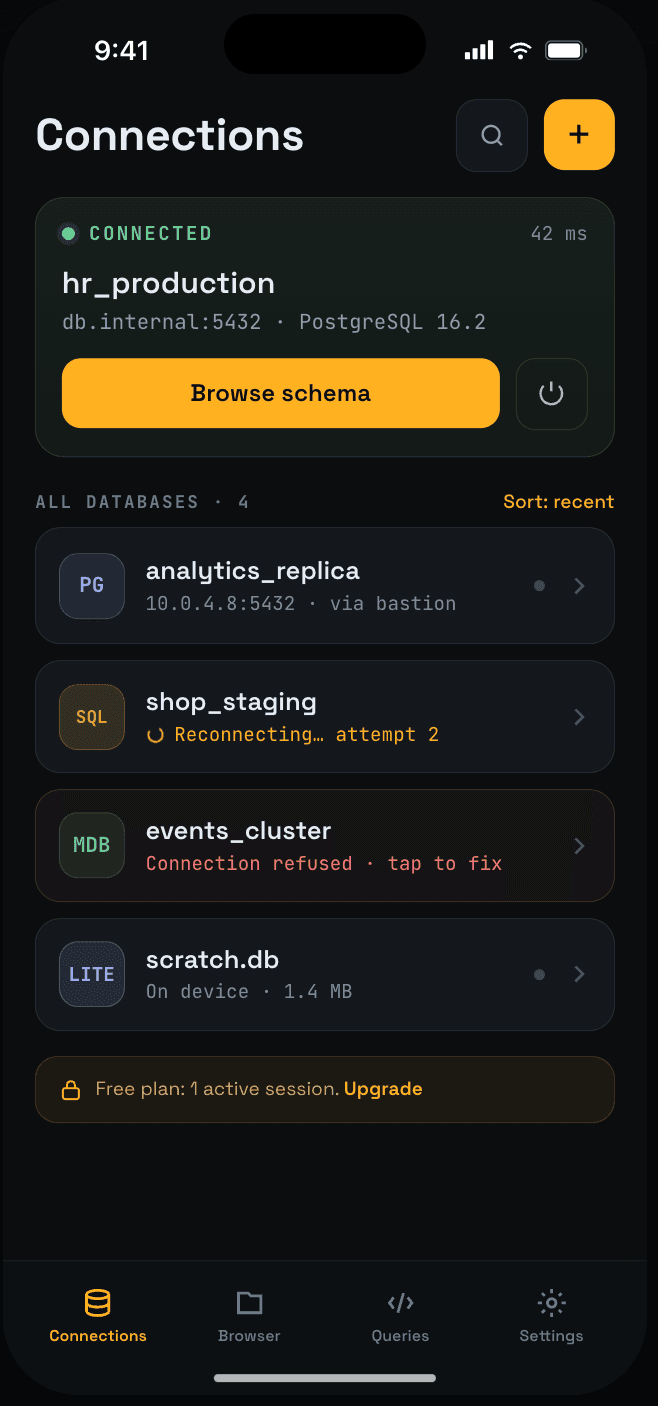
Thirteen engines, connected directly
 PostgreSQL
 MySQL
MySQL MariaDB
 MongoDB
 SQLite
- Hosted SQLite
 Neon
Neon Supabase
 CockroachDB
 TimescaleDB
 PlanetScale
- Aurora PG
- Aurora MySQL
Tier 1
available nowDirect TCP, wire protocol on the device. PostgreSQL, MySQL, MariaDB, CockroachDB, TimescaleDB, Neon, Supabase, PlanetScale, Aurora Postgres, Aurora MySQL, SQLite (local) and MongoDB (self-hosted).
Tier 2
in testing / nextMongoDB Atlas and dbOrbit-hosted SQLite are built and in testing. ClickHouse, Elasticsearch, CouchDB, InfluxDB v2, BigQuery, DynamoDB and Firestore follow over HTTP APIs.
Tier 3
roadmapSQL Server, Oracle, Neo4j, Cassandra and ScyllaDB, and Snowflake. Proprietary protocols that need a relay, so they arrive after the direct engines.
Not a remote control for your laptop. The database client itself.
dbOrbit speaks the PostgreSQL, MySQL and MongoDB wire protocols on the device, the way psql does. There is no desktop app to keep running, no agent to install, and no third party holding your credentials.
Direct sockets
TCP and TLS straight from the handset, with SSH tunnelling for anything behind a bastion. Only MongoDB Atlas and our hosted SQLite, both coming soon, will go through a proxy, because SRV lookups and file storage need one.
Credentials stay put
Passwords, SSH keys, saved queries and history live in the iOS Keychain or Android Keystore. There is no dbOrbit account to sign into and nothing to leak server-side.
Built for thumbs
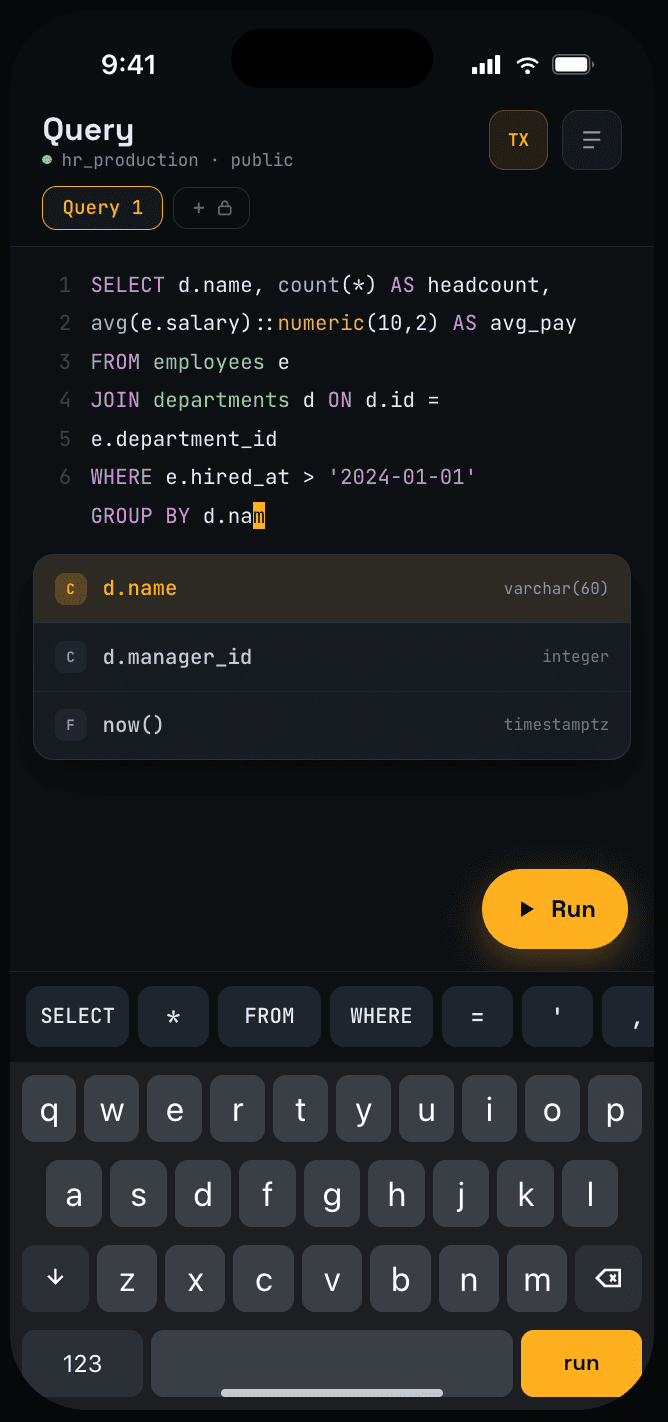
A SQL key row above the keyboard, schema-aware completion, frozen key columns, card view for wide rows, and a confirmation that shows the exact statement before it runs.
SQL editor
Write real SQL on a phone keyboard
Syntax highlighting, alias-aware autocomplete from your live schema, and a key row that puts SELECT, FROM, WHERE and the punctuation QWERTY buries one tap away. Every run can be wrapped in a transaction, so a typo rolls back instead of landing.
- Identifier auto-correct rewrites the editor so you see what actually ran
- Saved queries and 200 statements of history, on device
- Export results as CSV, JSON, SQL or EJSON through the share sheet
Safe writes
A phone is a bad place for an accidental UPDATE
Row edits and DDL accumulate locally. Before anything is sent, dbOrbit shows the generated statements, the rows affected and which foreign keys will cascade. Turn on read-only mode, for one connection or all of them, and writes are blocked outright.
- Batch changes commit as one transaction, or not at all
- Dropping a table needs its name typed out
- If the socket dies mid-statement, the app says so instead of guessing
Everything you reach for on the desktop
No companion-app shortcuts and no watered-down feature set — the same primitives, laid out for a 390pt screen.
Schema browser
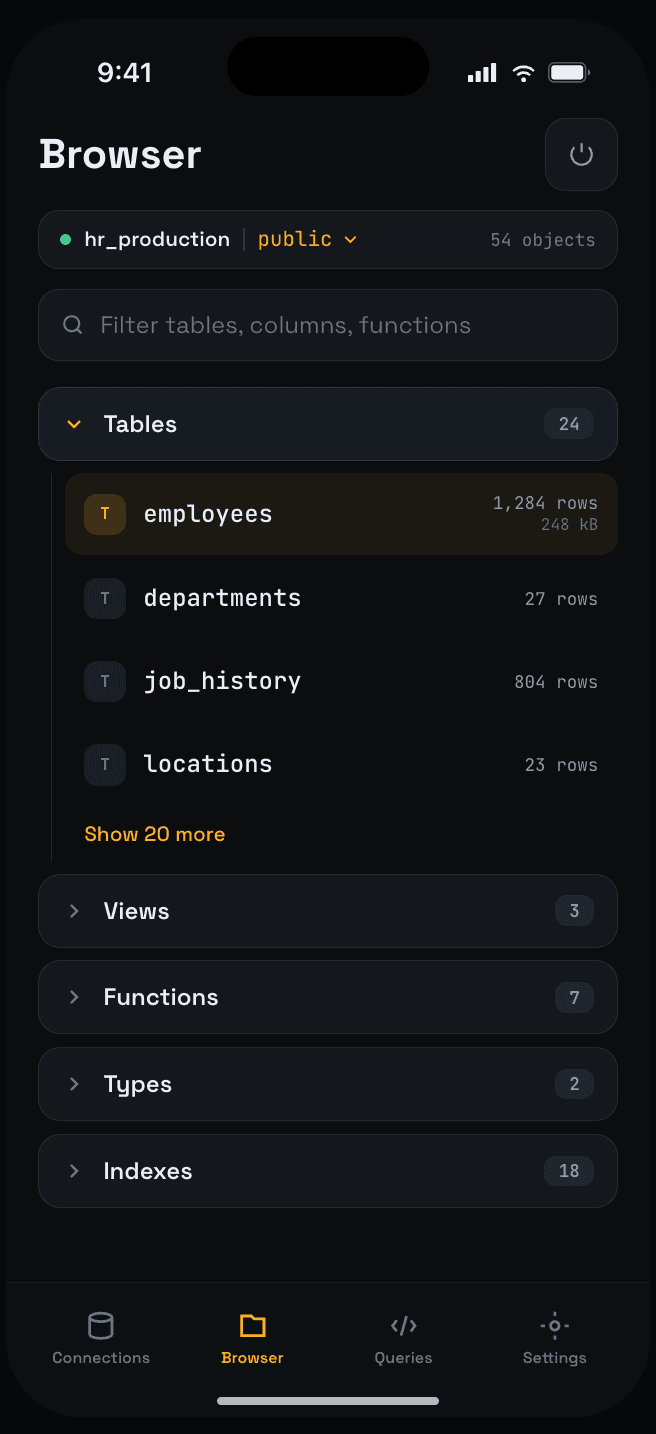
Tables, views, functions, types and indexes per schema, with row counts, sizes and unused-index warnings inline.
Data editor
Table and card views, a frozen key column, NULL as a first-class state, and row insert, update and delete with the statement shown first.
SQL editor
Highlighting, schema-aware completion, saved queries, 200 statements of history, and CSV, JSON, SQL or EJSON export.
Encrypted GitHub backup
Connections and saved queries, AES-256-GCM encrypted with a PIN-derived key, committed to a private repo you own. Restore from any commit.
Identity and access
Biometric unlock, PIN fallback, auto-lock, recovery by one-time code, and read-only mode per connection.
Security
Exactly what protects what
No vague reassurance. Here is the list, and what is still in progress.
Hardware-backed storage
Passwords, SSH keys and tokens sit in the iOS Keychain or Android Keystore, protected by the Secure Enclave or TEE.
Biometric gate and auto-lock
Face ID or fingerprint with a PIN fallback hashed by PBKDF2-SHA256. After a period of inactivity or time in the background, the app relocks itself.
Direct to your server
TLS when you enable it for a connection, and SSH tunnelling for hosts behind a bastion. Directly connected databases never route query traffic through us.
Encrypted backups, your repo
Optional backup of connections and saved queries, AES-256-GCM encrypted with a key derived from your PIN, pushed to a GitHub repo you own.
Scrubbed telemetry
Analytics and crash reports pass through an on-device scrubber first: SQL is cut to its leading keyword, and email addresses, IPv4 addresses and connection URLs are masked. Credentials are never sent.
In progress
A second encryption layer (SQLCipher) for the local store is being built. Until it ships we don't claim it — today's protection is the platform keystore above.
Against the alternatives
Most "mobile database" tools are a viewer bolted onto a desktop app, or a web console that wants your credentials.
| Feature | dbOrbit | DBeaver | DataGrip | TablePlus | Navicat | Beekeeper | pgAdmin |
|---|---|---|---|---|---|---|---|
| Native iOS app | single-engine | ||||||
| Native Android app | |||||||
| Runs with the laptop shut | iOS app only | ||||||
| Desktop app | |||||||
| Engines supported | 13 | 80+ | 30+ | 15+ | 9+ | 15+ | PostgreSQL |
| SQL and NoSQL in one tool | |||||||
| Credentials never leave the device | desktop | desktop | iCloud sync | Navicat Cloud | desktop | desktop | |
| Biometric or PIN unlock | |||||||
| SSH tunnelling from the phone | iOS app | iOS app | |||||
| Transaction-wrapped writes with a statement preview | manual | manual | manual | manual | manual | manual | |
| Encrypted backup to your own repo | vendor cloud | ||||||
| Export CSV, JSON, SQL, EJSON | CSV | ||||||
| XLSX export | planned | planned | |||||
| ER diagrams | |||||||
| Classroom / teaching mode | planned | ||||||
| Free tier | |||||||
| Price to start | free, then $0.99/mo | $19/mo Pro | $229/yr | ~$89 once | $399/yr | $99/yr Pro | free |
Where we win
Being the only client that is native on both phone platforms, tunnels SSH from the handset itself, gates access behind biometrics, and treats a write as something to confirm rather than something to fire.
Where the desktop still wins
Engine breadth — DBeaver reaches eighty. Long refactors, big imports and multi-tab diffing are still faster on a large screen, and XLSX export and multiple editor tabs are not built here yet.
How to read the notes
Navicat ships separate single-engine iOS apps rather than its full client. TablePlus can sync connections through iCloud. Beekeeper's SSH tunnels are a Pro feature. Comparisons reflect published information at the time of writing.
Education
GitHub Classroom, for databases
A teacher creates a classroom on one engine, sets exercises and assessments against a template database, and every student gets their own sandbox copy. Answers are checked against the reference result, and marks are released to the whole class at once.
- $4.99 per classroom per semester, up to 200 students
- Students join with a code, free, with no purchase of their own
- Classroom exercises and grading are in development — talk to us if you want to pilot them
Pricing
Free is a real plan, not a trial. Paid tiers are billed through the App Store or Play.
Free
- 1 connection on one engine: PostgreSQL, MySQL or hosted SQLite
- 100 KB hosted SQLite database
- 500 result rows
- Biometric lock and PIN
Indie
most popular- Unlimited connections, all 13 engines
- SSH tunnelling
- Schema autocomplete
- CSV, JSON and SQL export
- Encrypted GitHub backup
- 1 hosted SQLite database (1 GB)
Enterprise
- Everything in Indie
- Automatic GitHub backup
- Unlimited hosted SQLite (1 GB each)
- Shared connections and roles (in development)
- Audit logs and SSO (in development)
- Three seats minimum
Education
- One engine of the teacher's choice
- Up to 200 students
- Students join free
- Per-student sandbox databases (in development)
- Exercises and grading (in development)
Prices in USD, excluding local taxes. Subscriptions renew until cancelled and are managed in your store account. Grandfathered lifetime and Pro plans keep Enterprise access. Billing terms are in the Terms of Service, and how your credentials and data are protected is on the Security page.
Questions
Anything else — email support and a person answers.
What is dbOrbit?
dbOrbit is a mobile database IDE for iOS and Android, made by Metronio Technologies. It lets you browse schemas, run SQL, edit rows and export results from a phone or tablet, over a connection the app opens directly to your database server. There is no desktop companion app and no dbOrbit account.
Which databases does dbOrbit support?
dbOrbit connects to 13 engines today: PostgreSQL, MySQL, MariaDB, CockroachDB, TimescaleDB, Neon, Supabase, PlanetScale, Amazon Aurora PostgreSQL, Amazon Aurora MySQL, local SQLite files, dbOrbit-hosted SQLite and self-hosted MongoDB. MongoDB Atlas is coming soon. SQL Server, Oracle, ClickHouse and other engines are on the roadmap.
How much does dbOrbit cost?
dbOrbit has a free plan with one connection on a single engine you pick: PostgreSQL, MySQL or a 100 KB dbOrbit-hosted SQLite database. Indie costs $0.99 per month, Enterprise $1.99 per seat per month with a 3-seat minimum, and Education $4.99 per classroom per semester. Paid plans are billed through the App Store or Google Play.
Does my database need to be on the public internet?
No. dbOrbit can reach a PostgreSQL- or MySQL-family database behind a bastion host through its built-in SSH tunnel, or through a VPN profile on the phone. The phone needs a network route to the server, not a public IP address on the database.
Does dbOrbit see my data?
Not for directly connected databases. PostgreSQL, MySQL, MariaDB, their compatible cloud engines, self-hosted MongoDB and local SQLite connect straight from the phone, so credentials, queries and results never pass through dbOrbit's servers. dbOrbit-hosted SQLite runs through dbOrbit's proxy, as will MongoDB Atlas when it ships.
What happens when dbOrbit goes to the background?
iOS closes background network sockets after about three minutes. dbOrbit reconnects when you come back, keeps the cached schema readable while the connection is down, and tells you plainly if a write was interrupted mid-statement instead of guessing whether it committed.
What happens to my data if I uninstall dbOrbit?
dbOrbit keeps connections, SSH keys, saved queries and history only on your device, so there is no server copy to restore from. Turn on encrypted GitHub backup if you want to restore them onto a new device.
Can I run risky SQL safely in dbOrbit?
Yes. On PostgreSQL, MySQL and SQLite connections each run can be wrapped in an explicit transaction, so an error rolls back. Row edits and DDL show the exact statements before they run, dropping a table requires typing its name, and read-only mode blocks writes.
Is there an iPad version of dbOrbit?
Yes. dbOrbit runs on iPad today with the phone layout scaled up. Dedicated landscape and split-pane layouts for iPad are in development.
Put the database in your pocket.
Free to start, no account, nothing to install on a server.